














DAP145 - Industrial Wireless Access Point with RS485 Interface - Teltonika
Specific project or quantity requirement?
For a multi-site deployment, a specific technical requirement or a volume order, please contact us for tailored advice or a customised offer.
CREATE YOUR ACCOUNT AND DISCOVER OUR SPARWAN ADVANTAGES

Dedicated Sales Representative
Sourcing and Consulting

Partner Rates
and volume discounts

Payment Terms
suited for pros
DAP145 - Industrial Wireless Access Point with RS485 Interface - Teltonika
Industrial Wi-Fi Access Point with RS485 Gateway
The Teltonika DAP145 connects industrial RS485 devices to an IP network without requiring new data cabling. It can operate as a Wi-Fi access point or as a client to integrate existing equipment into a wireless infrastructure.
RS485 to IP network
The native RS485 interface supports serial-to-IP bridging. Teltonika also highlights support for Modbus and the Data to Server tool to collect and convert industrial data before transmission to a remote platform.
Flexible Wi-Fi Modes
The DAP145 offers access point, station, Mesh, and Fast Roaming modes. These functions allow for extending coverage, creating a data collection link, or supporting equipment mobility within an industrial network.
Management with RutOS and RMS
The RutOS system provides industrial configuration and communication tools. The Teltonika RMS platform allows for remote administration and supervision of deployed equipment.
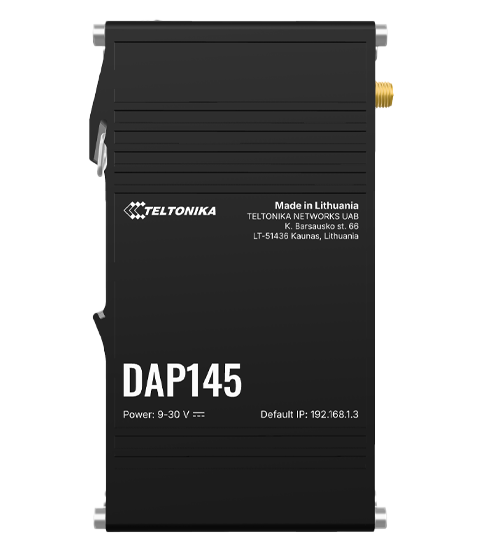
Design for Industrial Cabinet
The narrow housing integrates DIN rail mounting and power supply via a top terminal block. The manufacturer's marking indicates a power supply of 9 to 30 VDC.
Key Features
- Industrial Wi-Fi access point and client
- Native RS485 interface
- Serial-over-IP bridge and Modbus support
- Mesh and Fast Roaming modes
- RutOS and RMS management
- Integrated DIN rail mounting
- 9 to 30 VDC power supply
| Specifications | |
|---|---|
Power Supply |
9 to 30 VDC
|
Mounting Type |
DIN rail
|
|
|
|
Supported Protocols |
Modbus and Serial-over-IP
|
Configuration Mode |
|